Succuline: A Single-Line Font for Creative Projects
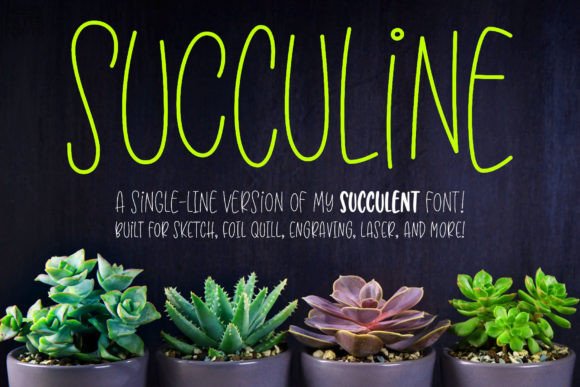
Discover the charm of hand-lettered style with a modern, technical twist. Succuline is the single-line version of the beloved Succulent font, offering all the fun, bouncy character of its double-uppercase predecessor in a format specifically designed for a world of creative applications beyond traditional printing.
Unlike standard fonts, single-line and hairline typefaces like Succuline are crafted for tools that draw with a continuous path rather than filling an outline. This makes them ideal for laser engraving systems like Glowforge, sketch pens for Cricut and Silhouette machines, foil quills, embossing tools, and infusible ink pens. The result is elegant, clean lettering that looks professionally drawn or etched.
Designed for Versatility and Ease
Even though Succuline is distributed as TTF files, all characters are OpenType coded and PUA-encoded. This thoughtful engineering ensures easy access and compatibility across a wide range of software. You can seamlessly use this font in vector-based programs such as Adobe Illustrator, CorelDRAW, Affinity Designer, and Inkscape. Simply apply a stroke and no fill to the text, adjust the weight to your preference, and then expand the text to outlines for a perfect, scalable result.
Creative Applications and Project Ideas
The unique format of Succuline opens up possibilities for projects that demand a polished, artisanal touch. Consider it for:
- Logo and Brand Identity Design: Create distinctive wordmarks and brand assets with a handcrafted feel that stands out.
- Packaging and Product Design: Engrave or draw elegant labels, box designs, and product names for a premium presentation.
- Poster and Editorial Design: Add sophisticated, script-inspired headlines to magazines, posters, and flyers.
- Social Media Graphics and Web Elements: Craft eye-catching quotes, titles, and overlays with a modern, organic aesthetic.
- Merchandise and Invitations: Personalize items like tote bags, mugs, wedding invitations, and greeting cards with custom drawn text.
Tips for Choosing and Using Succuline
When integrating a new typeface into your workflow, a few considerations can elevate your results. First, always test the font at the size you intend to use it to ensure readability and visual impact. The bouncy, playful style of Succuline is fantastic for display and headline use but may be less suited for long body text.
Think about the mood of your project. This premium font conveys creativity, approachability, and a touch of whimsy, making it perfect for lifestyle, craft, food, or boutique brands. For effective font pairing, try combining it with a clean sans serif font for body copy to create a balanced and professional layout.
Since single-line fonts operate differently, familiarize yourself with their behavior in your chosen software. Succuline comes in both single-line and hairline versions; different programs may prefer one format over the other. Downloading and installing both allows you to test which works best for your specific tools and projects.
Ultimately, the right typeface is a fundamental design asset. A well-chosen font like Succuline does more than just display words; it enhances visual consistency, strengthens brand recognition, and elevates the overall professional presentation of your work. It’s a creative tool that helps bridge the gap between digital design and tangible, handmade artistry, giving your projects a unique and polished character that truly stands out.